
Connect Telegram via a Bot
To connect Telegram to OneTwoAgent, create a Telegram bot in BotFather and paste its token into OneTwoAgent.
Telegram support automationTelegram sales bot setupBotFather configurationInbound messaging automation
How Telegram connection works
- Telegram is connected through an official bot token from BotFather.
- This is the standard Telegram method for platform integrations.
- There is no reliable alternative to bot-token connection for Telegram messaging.
Step 1. Create a bot in BotFather
BotFather is Telegram’s official bot management tool.
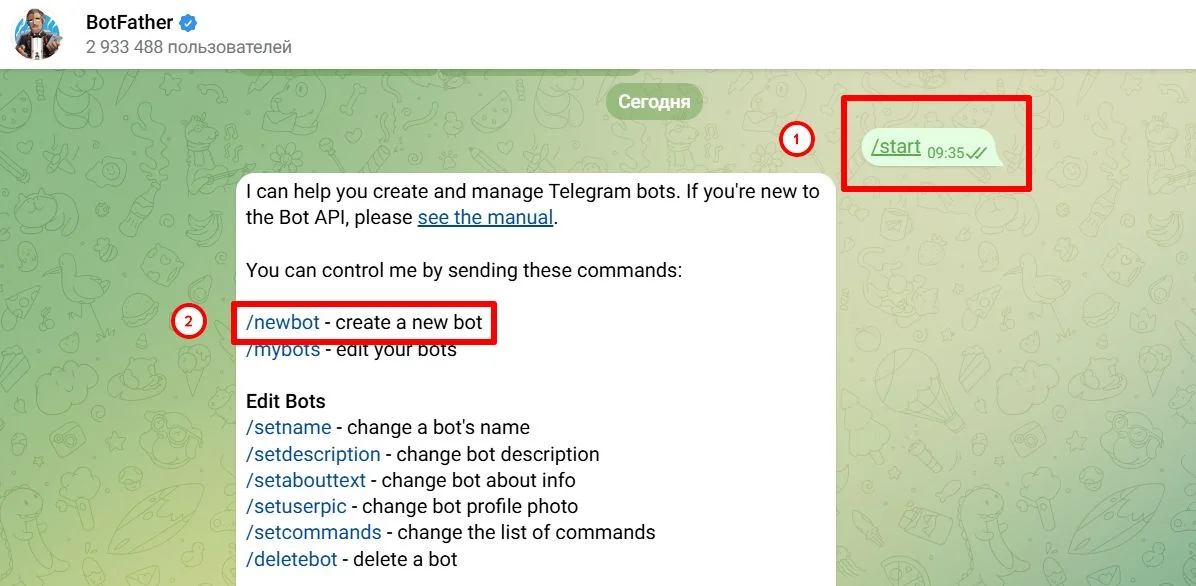
- 1Open BotFather.
- 2Press Start
- 3Send command: /newbot
- 4Enter bot name (display name users will see).
- 5Enter bot username (must end with "bot").
- 6BotFather returns your bot token.
Notes
- Username examples: MyBrandSupportBot, OneTwoAgentSalesBot.
Step 2. Copy the token
BotFather sends a long token string, for example:
- 1234567890:AAHhGgExampleTokenText_abcdef123456
- Copy it exactly with no extra spaces.
- Keep token private: anyone with it can control your bot.
Step 3. Connect the bot in OneTwoAgent
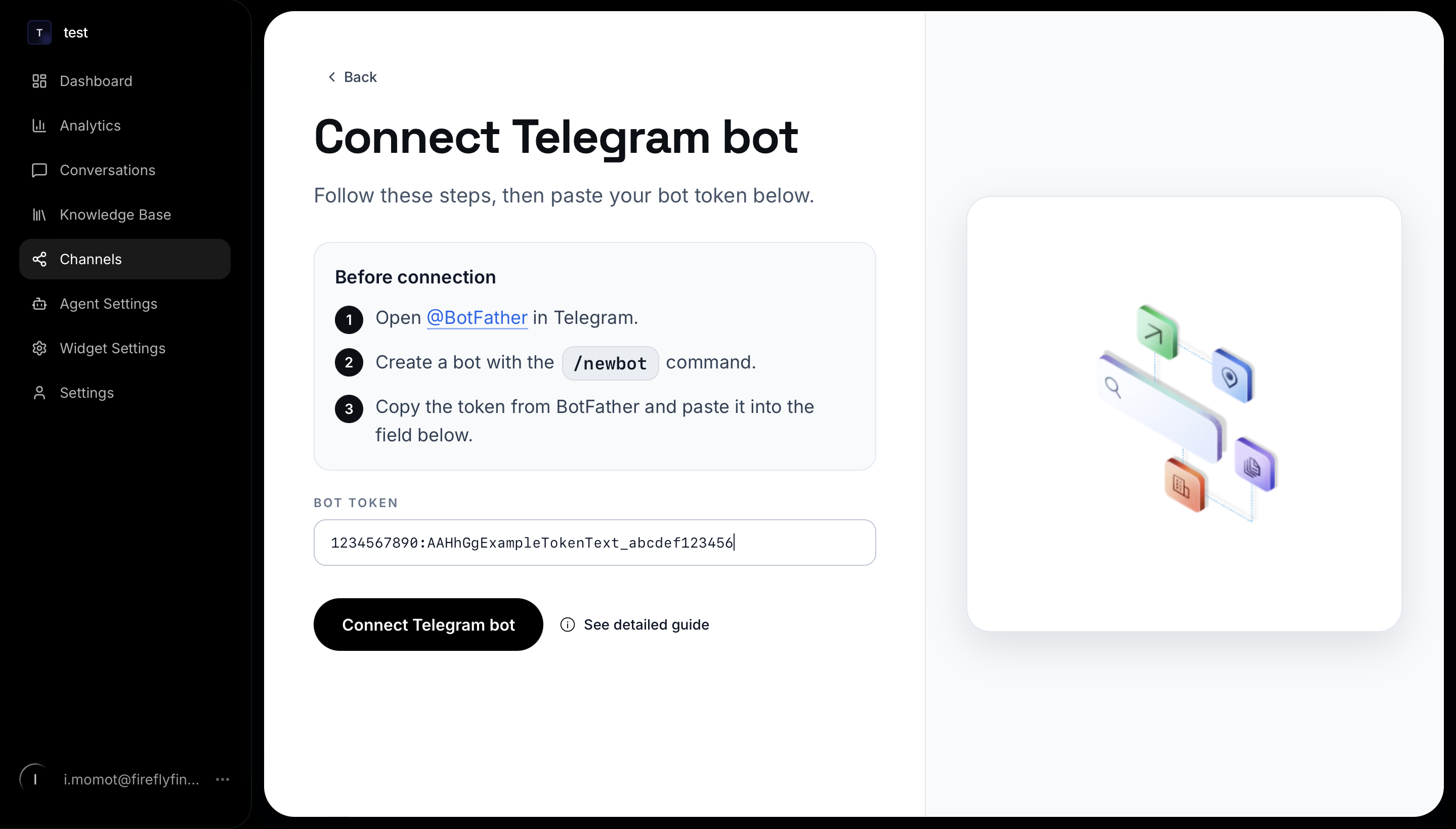
- 1Open Channels.
- 2Choose Telegram.
- 3Paste token into token field.
- 4Click Connect
Notes
- If token is valid, channel status changes to Connected.
Step 4. Test it
- Customers can now message your Telegram bot.
- Your team can reply from OneTwoAgent Conversations.
- Manual and Auto Sales behavior follows your current settings.
- 1Open your bot link from BotFather.
- 2Send at least one message to the bot.
- 3Open OneTwoAgent -> Conversations.
- 4Verify a new conversation appears.
Common issues
- Token is invalid: copy token again directly from BotFather and remove extra spaces.
- No chats in Conversations: user must send first message to the bot after connection.
- Wrong bot connected: disconnect and reconnect with correct token.
Tips for a clean customer experience
- Use a clear bot name and username customers can trust.
- Include your brand name in bot display name.
- Set a short welcome message so customers understand what the bot is for.
How it works for your team
- All Telegram chats appear in OneTwoAgent -> Conversations.
- Your team can manage replies from OneTwoAgent without opening Telegram.
Related guides
Continue with the next setup steps around channels, booking, scheduling, or automation.
Common questions
Do I need BotFather to connect Telegram?
Yes. Telegram connection is based on an official bot token from BotFather and that is the standard setup path for this integration.
Is there another Telegram connection method besides a bot token?
Not for this flow. The reliable setup path is to create the bot in BotFather and paste its token into OneTwoAgent.